
台式机DIY:软件-asus b460m 华硕b460主板装win10系统及bios升级教程(支持10代cpu驱动)
Table of Contents
TUF GAMING B460M-PLUS
https://www.asus.com.cn/motherboards-components/motherboards/tuf-gaming/tuf-gaming-b460m-plus/helpdesk_download/?model2Name=TUF-GAMING-B460M-PLUS
bios
https://www.asus.com.cn/motherboards-components/motherboards/tuf-gaming/tuf-gaming-b460m-plus/helpdesk_bios/?model2Name=TUF-GAMING-B460M-PLUS
用户更新BIOS的方式,通常是透过Windows BIOS更新软件,但是有时候操作系统中毒或是大量常驻程序等不稳定因素,可能会造成BIOS更新失败.
ASUS EZ Flash 3可以不必进入Windows操作系统,即可更新BIOS版本
ASUS提供了三种环境下更新主板BIOS的方法:
● 在BIOS环境下更新BIOS (使用EZ Flash),可参考FAQ:华硕EZ Flash 3介绍.需解压 zip
● 在Windows作业环境中更新BIOS(使用EZ Update),可参考FAQ:EZ Update介绍 需解压 zip
● 在关机或没有安装CPU的状态下更新BIOS(使用USB BIOS FlashBack)
way 1. ASUS EZ Flash 3 in bios setup gui。run ok 202511
step 1. download firmvare
bios
TUF GAMING B460M-PLUS BIOS 1601
版本 1601
8.42 MB
2022/04/07
"- Improve system stability
- Intel security update
- Update WPBT(Windows-Platform-Binary-Table) driver for Windows inbox I219/I225 LAN."
download latest bios fireware for asus B460M
https://www.asus.com.cn/motherboards-components/motherboards/tuf-gaming/tuf-gaming-b460m-plus/helpdesk_bios?model2Name=TUF-GAMING-B460M-PLUS
202511
https://dlcdnta.asus.com.cn/pub/ASUS/mb/BIOS/TUF-GAMING-B460M-PLUS-ASUS-1901.zip
step 2. unzip it to dir
step 3. restart pc and enter bios setup
step 4. flash bios firmware via ASUS EZ Flash 3
way 2.MyASUS software tool not success
华硕管家MyASUS | 官方支持 | ASUS 中国
https://www.asus.com.cn/support/myasus-deeplink/
注:要注册登录,
其他驱动
all kind of driver for TUF-GAMING-B460M-PLUS
https://www.asus.com.cn/motherboards-components/motherboards/tuf-gaming/tuf-gaming-b460m-plus/helpdesk_download?model2Name=TUF-GAMING-B460M-PLUS
202511
在Windows作业环境中更新BIOS(使用EZ Update),可参考FAQ:EZ Update介绍 需解压 zip
step 1.download bios firmware(zip) and unzip it
step 2.download and install EZ Update (unzip Easyupdate2_Win8_64_VER30008.zip,then install it)
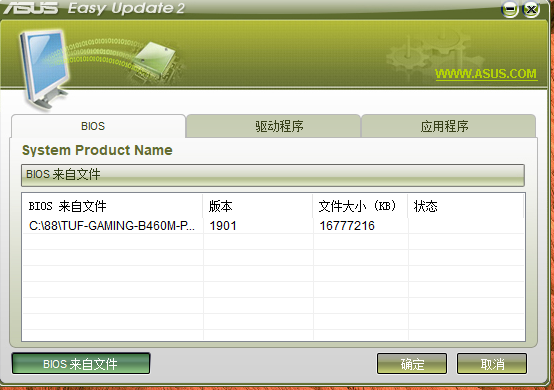
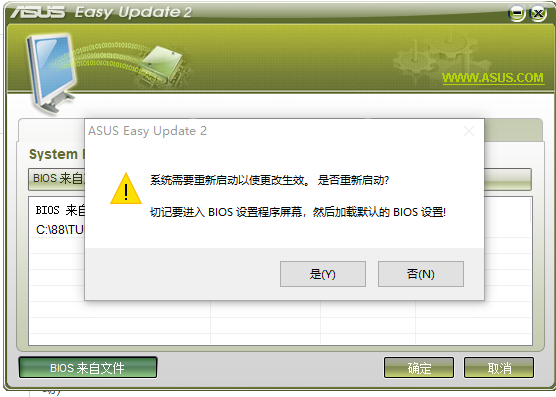
step 3. install bios via EZ Update app on windows10
bios init
bios工具 → F7bios设置 →Advanced
├─ secure boot:disabled
├─ boot mode:uefi
└─ Intel VT-x:enabled
bios - F7 - Advanced-Cpu Configuration
关闭安全启动(即设置secure boot为disabled)
boot mode设置为uefi
使用用uefi引导+gpt分区
asus b460 Advanced - 》 Cpu Configuration -》 intel vtx ->set to enabled
刻录盘引导方式:bootable mode:uefi+gpt
https://rog.asus.com.cn/support/faq/1012815/